Yeah ...!! Finally The Day Arrive For Which Every Developer And A PC/Windows Users , In A Press Conference Today on 15th September 2011 Steven Sinofsky President OF....
A Bitcoin is just like a bank you nsave your money, it is a kind of cryptocurrency investement that have value. So officially Bitcoin is a form of digital currencey, created and held electronically. No one owns it or has its monopoly, you can have it , i can also have. They are not printed like dollars or Euro but produced by people, increasingly business, running computers all round the world, using softwares that solves mathematical problems. In this blog, i will show you simply how you can gain free $10 worth of biticions (BTC) that means when you want to withdraw or convert to nigeria Naira or your country's currency, you are goin g to sell the unit value to the buyer , so as to pay you in your country's currency. now lets do some arithmetic convertions.
I have 0.0276136 BTC and i wanna convert it, will be
as by the time of writting, 1BTC = 720USD 0.0276136 BTC * 720 =$ 19.881792 APROX.= $20 $20 * 510= N10,200
That is exactly how i converted to biticoin. you also can do more than me.
Before you can earn bitcoin, you are required to have an account number, just like your local banks do, but here do to its digitility, you have to open a WALLET
1. Create a Bitcoin Wallet Here but for the purpose of this tutorial, get Click to Get Wallet, because it is to that address that your earnings will be sent to. 2. Go to http://www.freebiebitcoin.com 3. After Registration on the first, copy your Bitcoin address enter it into the second and 4. Finally give answers or reply or take a little task within 5 minutes , you will be credited with $10 in your bitcoin account you entered.
With the ever increasing growth in Electrical and Electronic appliances, people are familiar with Microwave ovens, Mobile phones,
Televisions, Laptops, Washing machines, Mixer grinders etc. You may be
using them frequently. Also, you may notice the symbol with a line in a
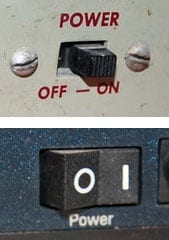
broken circle on the power button. Had you ever got a doubt that “what does this symbol mean?“. Isn`t amazing after listening that there was a connection in between the world war II and the origin of power button symbol. Here is an interesting fact about the origin of the power button symbol.
Initially, switches had a lever or slider that could move to either of two physical positions ON and OFF. You may also notice a word POWER on the switch. Later, two words were replaced with I and O. we have to toggle between on and off. As a result, there are different I and O.
But after the evolution of microprocessors,
switches were made more economic with a simple pushbutton switch. The
computer inside could take care of figuring whether you meant ON or OFF.
After this invention, there arose a necessity for an icon that conveys
both on and off options. There comes the utilization of a fact that
engineers used the binary system to label power button during world war II.
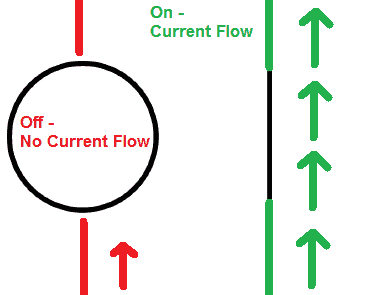
In binary systems, 1 means “on” and 0 mean “off.”
In 1973, the symbol in which 1 and 0 were superimposed was standardized as the power button symbol by the International Electrotechnical Commission(IEC). ON/OFF can be identified by the color represented by the power button.
Here is one more interesting fact about this
symbol. You will never look at the symbol after knowing this
information. This symbol is also used as a power on indication on NYC condom wrapper.
This article will strike into your mind whenever
you see a power button. Isn`t amazing to know about the origin of the
power button? comment your opinion.
What if you lock your car and forget the keys within? This is something
that can ruin anyone’s day. It is even worse if you’re far away from
your home to get your spare key. Though there are few possible ways like
smashing a front window and unlock it manually or call a locksmith,
here we have an awesome and pretty easy trick to unlock your car in just
10 seconds! And all you needed is just a shoelace.
All you need to do is create a slip knot
with your shoelace, place the lace at the top right corner of the door,
and wiggle it down into the car. After placing the slip knot over the
lock button, you should be able to pull on one side of the shoelace to
tighten the knot, pull it up, and then unlock the car.
A video below shows how easy it is to
unlock your car using a shoelace. Save your car and yourself from
smashing your car window, by learning to unlock your car with this
simple trick.
Watch the Video here:
The next time you forget your keys in
the car, try this pretty simple trick. But do make sure you unlock only
your car with this super easy trick and not anyone else’s 😉
NOTE: While this
shoelace tactic appears effective for cars with vertical facing locks,
you’re going to be out of luck if you drive a vehicle model where the
locks are horizontal and embedded into the door handle. This trick will
only work on cars of a certain age given that modern security systems
are a lot more sophisticated today.
Your Android wants to help you out; it’s just waiting on the word.
Google will help to send an email or text, or even figure out what song
is playing on your mobile just by listening to you.
Click on the microphone icon in Google search (or say “OK Google”)
and send an email or text (just say, “Text Siri, Where are you?” or
“Email John, When are you coming?” and hit send), or email yourself a
reminder (“Note to self, call John”). You can even find out about the
weather or traffic (“Do I need an umbrella today?” or “How is the
traffic now at East Zone”), track your flights or packages (if you’ve
gotten confirmation emails), figure out what song is playing on your
mobile (”what’s that song?”) or simply ask any research question you’d
otherwise type into the search bar. Google listen will find it out.
2. Swipes to make your phone work quicker
We use one finger to swipe for notifications. Use two fingers to swipe down for quick settings.
3. Allow calls from selected people you want
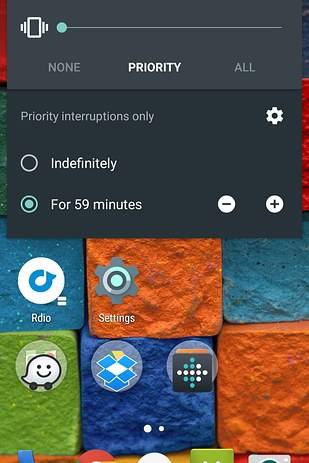
The Priority Mode feature will give you the options to be interrupted by the people you want.
4. Use Wallet to extend the battery life
This is a power wallet which has a lightweight backup battery for android phones.
5. Use ‘Smart Lock’ to unlock the phone automatically when you are at home
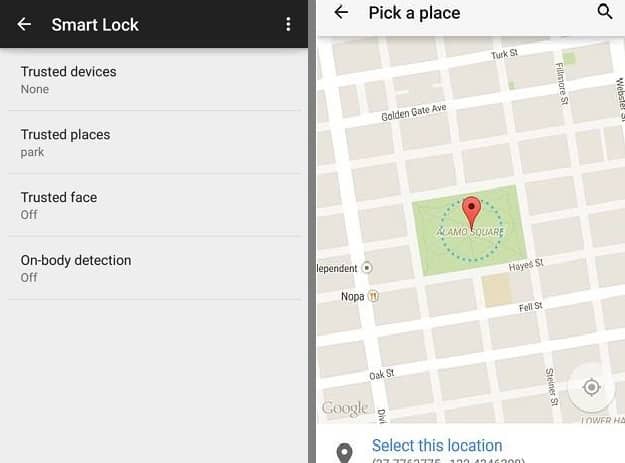
This setting will automatically change when you are outside your home. And you also have the options to set trusted places.
6. Control an LED light bulb from your phone
LIFX is a WiFi enabled, multi-color, energy efficient LED light bulb that you can control with your Android.
7. Try Pushbullet
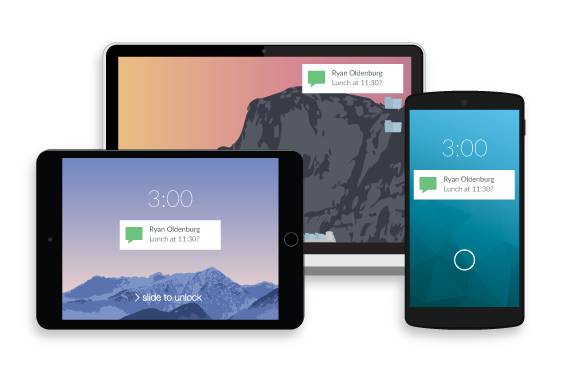
Copying and pasting URLs is so old fashioned now. Install PushBullet
to push links on your phone to your tablet, from your PC to your phone
or from your phone to all of your other devices. Pushbullet also
notifies you of SMS or calls on your PC and you can transfer files
between all of your devices with Pushbullet too.
8. Instantly solve a math equation by taking a picture of it
Photo Math – Take picture of Math equation, it will solve it
9. Plug a mouse into your phone
You can plug a wired or wireless mouse into an android phone and it’ll work.
And keyboard as well!
10. Invert colors
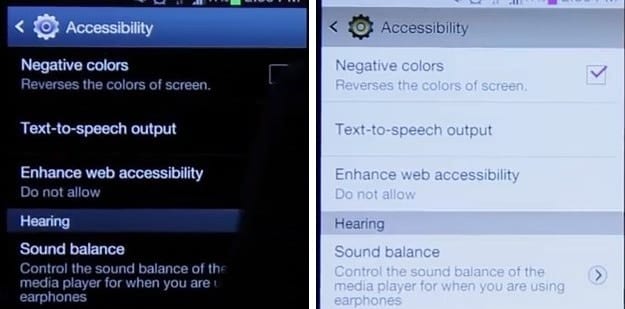
This setting will allow you to read at night without disturbance.
Just go to Settings > Accessibility > Negative Colors and make
your Android a little more readable at night and a lot more trippy.
11. Use ‘Smart Stay’
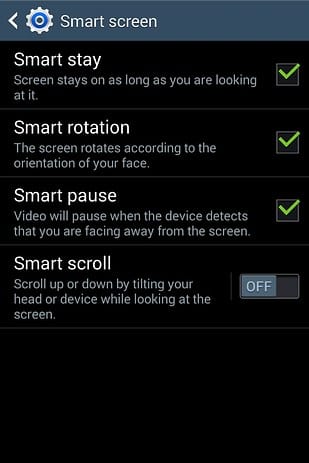
Smart Stay is another Samsung-specific feature, which keeps your
Android at a bright display for as long as your eyes are on it. Just go
to Settings > Display/Smart Screen > Smart Stay.
12. Encrypt your phone
This will scramble your data to protect all of the data and password.
13. If found, return to
This is another great feature for anyone with a tendency to misplace
their phones. If your phone gets lost and you suspect it has been picked
up by someone, you can put a message on the lock screen, telling the
finder of your phone how to get in contact with you.
You can achieve the same thing with Android Device Manager if you’ve
already lost your phone, but the option can be done in advance as a
safety measure. Go to Settings > Security > Lock screen message to
add your phone number, email or return instructions.
14. Remote lock or wipe your lost phone
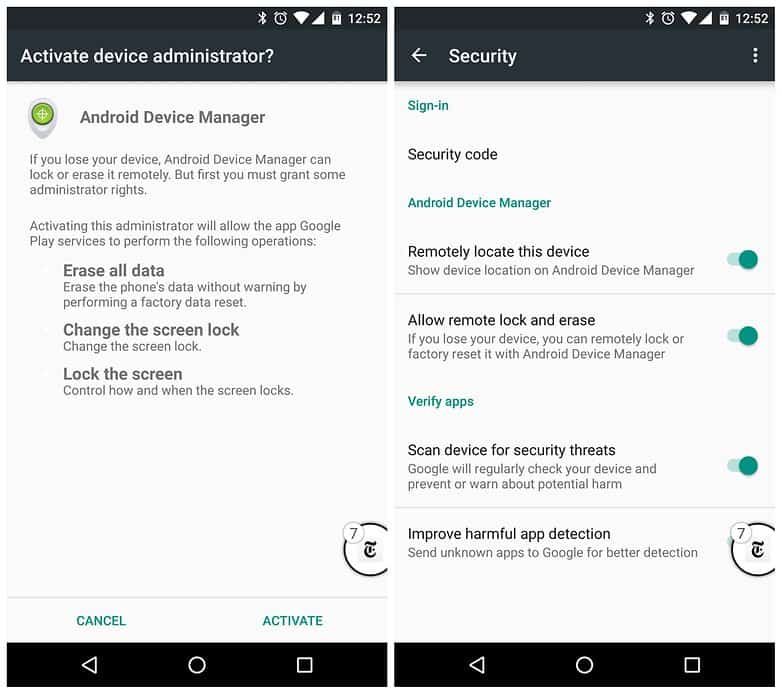
There’s not much worse than losing your phone. Apart from losing your
phone, knowing that someone might have access to your data is even
worse and downright dangerous. But Google has an awesome feature called
‘Android Device Manager’ that lets you track and take control of your
phone if you ever lose it.
As long as ADM is activated, you can ring your phone, remotely lock
it or even factory reset it if you know you’re never getting it back. To
enable Android Device Manager, go to Settings > Security > Device
Administrators and access the site on your computer if you ever lose
your phone.
15. Access Chrome tabs from other devices
As long as you’re logged into Chrome when you launch a new tab,
you’ll see the ‘Recent tabs’ option at the bottom right. Tap this to see
the URLs that are open on your other logged-in devices and quickly
access any of them.
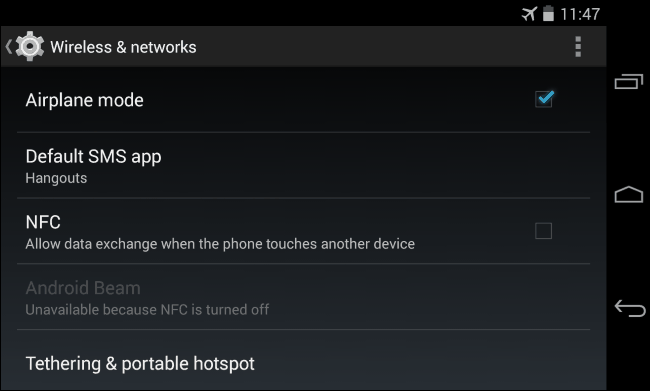
When you fly, the minute you’re on
board, you make sure your phone is on airplane mode. And it’s a standard
practice to be told by flight attendants to switch your devices to
airplane mode during transit. But, have you ever wondered what would
happen if you don’t follow directions and didn’t put your phone on
flight mode when you’re up in the air?
Many people believe that a phone’s signal can interfere with a plane’s
electrical and telecommunication systems and cause a plane to crash. Is
it true? Let’s find out what exactly happens when passengers or crew
don’t switch their phones to Airplane mode during a flight!
There is no evidence that signals from
passengers’ electronic devices have ever caused a plane to malfunction
and crash. The reason for potential safety concerns is due to the fact
that when you’re more than 10,000 feet in the air, your cell phone
signal bounces off multiple towers and sends out a stronger signal. This
is something that might congest the networks on the ground. But, there
has never been a case of a cell phone causing a plane to crash.
" In a blog post for Airline Updates, a
pilot said that transmitting mobiles can cause audible interference on
an aircraft’s radios, but it is rare. He said: “Your phone will probably
annoy a few pilots and air traffic controllers. But, most likely, not
badly enough for them to take action against you if that’s what you want
to know.”
“You may have heard that unpleasant
noise from an audio system that occasionally happens when a mobile phone
is nearby. I actually heard such noise on the radio while flying. It is
not safety critical, but is annoying for sure.”
However, he also continues by saying that if 50 people on the plane did
not turn their phone onto airplane mode, it would cause a lot of “radio pollution“.
An engineer named ‘Coenraad Loubser’ said on Quora:
“To compound matters, the weaker the signal your cell phone picks up
from the tower, the more it amplifies its signal to try and get a
response (and the more battery it uses). Planes with onboard cell
coverage, allow your phone to communicate using very low power, or Wi-Fi.
When you put your phone in Airplane mode, the GSM/3G Radio inside your
phone is completely disabled and you can still use the phone for other
functions.”
Now, you know the reason! Hence, by
switching your phone to airplane mode, you show your appreciation to the
people charged with getting you safely to your destination.
You may be familiar with a word “password leaks” as it is trending in
the cyber security news from the recent times. News on the hacking of
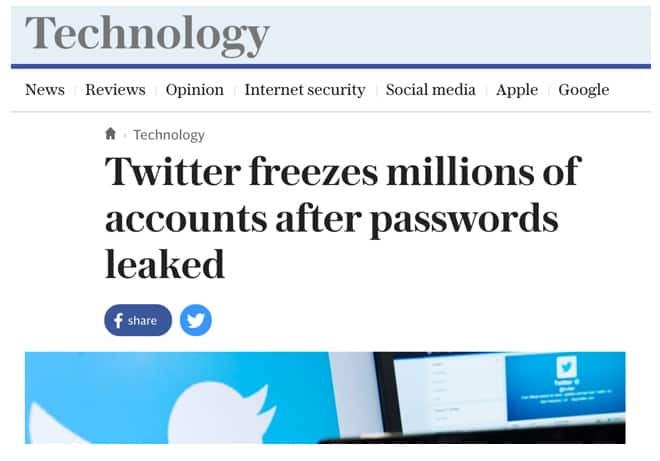
various accounts in the Facebook, Team viewer, Twitter, LinkedIn is swirling virally in the social media. Millions of Facebook and Twitter accounts were hacked in the past few days. Even Mark Zuckerberg account was hacked.
These password leaks happen all the time. One of your accounts may
also get hacked one or the other day. Here are some useful tips that are
to be followed by every user to ensure their safety. Initially, you
need to know, how your password gets leaked?
How Do Password Leaks Happen?
Hackers find a way in, grab the database that contains hashed passwords, and then sell them off.
Information may also be leaked from an inside source i.e in the case of the Ashley Madison data leak. Disgruntled employees have a reputation for causing various types of havoc, and data leaks are among their tactics.
Irrespective of the source through which data obtained, it’s then
either sold on the dark web or posted publicly on a site like Pastebin.
Following are the things you need to to do for your account security:
#1. Stay Informed
You can save your account when you have the information about your
account all the time. You need yourself to be updated in the aspect of cyber security news. So that you can know what`s going on. Regularly, you need to check the sites like LeakedSource.com blog or following Twitter accounts like@passwordsleaks or @PastebinLeaks, when there’s been a big leak. You may also follow tech on Google News.
You can also set up a Google Alert for “password leak” and get notifications when there’s a new one in the news. For better ensuring, go to haveibeenpwned.com and enter your email address to check whether your account is listed in it or not.
#2. Change Potentially Leaked Passwords
Immediately change your password when you get a doubt that your
password was leaked. In fact, you should probably just change your
passwords on a regular basis anyway. You will get notifications whenever
your password gets old. It is also better to save a reminder in the
Google calendar. You may also use password manager for better remembering.
#3. Enable Two-Factor Authentication on Important Accounts
Using two-factor authentication (2FA)
on as many accounts as possible is a great way to stay safe from
password leaks. Though a person who knows your password also cannot
access your account as you get an authentication code in the form of a
message to your mobile. This adds additional security to your account.
#4. Don’t Duplicate Passwords
Don’t use the same password for all your accounts. If you use the
same password for all accounts, then there might be a risk of hacking of
all your accounts when a single account of yours gets hacked. You need
to set a strong password for every site.
LastPass’s Security Challenge will even tell you how secure your
collection of passwords is by looking at the strength of each password,
potentially compromised sites, old passwords, and the number of
duplicates that you have in your database, which will help you identify,
and get rid, of ones you’ve used multiple times.
Find out if your accounts have been compromised, change the passwords,
set up two-factor authentication, and start changing your other
passwords on a regular basis. It feels like a lot of work, but the
consequences for not doing it are much worse.
Using a power-efficient browser is one
of the best ways to get more out of your PC or tablet. But,
unfortunately, poor power efficiency is one of the most troubling
problems a laptop user faces. On Monday, Microsoft decided to prove to
everyone that its own proprietary browser might be the best in the
market for your battery.
Entering the battleground of today’s
leading web browsers such as Google Chrome, Mozilla Firefox, and Opera,
with its new revamped Edge browser, Microsoft has launched a video test
that shows why using Chrome, Firefox or Opera on your laptop might be a
bad idea. They compared the battery life of laptops running Edge, with
the battery life of laptops running other three browsers.
To do the test, Microsoft ran the Edge,
Chrome, Firefox, and Opera browsers on the Surface Book. Then, they
automated each browser to perform the same series of activities. The
Chrome browser was the first to lose, which just lasted 4 hours and 19
minutes. The second one to lose the game was Mozilla Firefox, which
lasted for a little more than 5 hours approximately. Opera, with its new
battery saver feature, also stayed in the game for 6 hours 18 minutes
before giving up. However, the video test declares the Edge browser as
the winner, with it lasting up to 7 hours 22 minutes before draining the
battery of the Surface Book.
Hence, this controlled environment
battery test shows that Edge gives you up to 36%-53% more battery life
as compared to other alternatives.
A decade ago, we came across various torrent search
engines. But unfortunately in 2009 major file sharing sites which
belonged to the torrent community were closed by the authorities. So, In
February 2009 a fresh engine KickassTorrents
was established. The site has many innovative functions that have been
improved out of the elder systems. Now it has more than 10 million files
being shared on the whole, as hundreds of thousands of users
communicate and share data daily in different languages worldwide. It is
available for free. Registered users have an additional benefit that
they can avail ad-free version with faster speed. KickassTorrents holds
its place in top 3 of the most used torrent sites from the beginning of
2012. Its user activity and the number of members is growing rapidly.
Though it is labeled as a search engine, it shows results as files
rather than as pages. Whatever one’s specific desires, anyone will find a
helpful tool with KickassTorrents. The website recently entered the
dark web and got an official .onion TOR domain name.
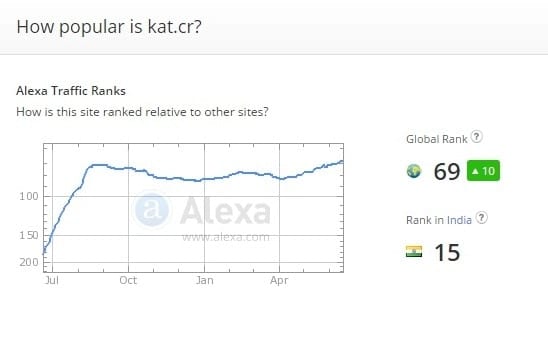
Right from the beginning, Kickass torrents continued to gain spots on Alexa ranking charts. During the launch of Kickass torrents, Mininova and Isohunt occupied
the top positions. From the beginning,Kickass torrents gave a higher
competition to both the sites. And now, Kickass torrents became the king
of the torrent kingdom.
Continuing its exponential rise, KickassTorrents entered the Alexa top 70. Mininova achieved this ranking in 2007. Kickass torrents also hold top position for handling larger library.
In the recent Alexa ranking Kickass torrents secured
worldwide 69th rank.
15th rank in India.
Google, Youtube, Amazon, Facebook, Flipkart occupied a place in the top 10.
While many search engines and file download options are available all
across the worldwide web, KickassTorrents rises to the top with its
superior technology and programming.
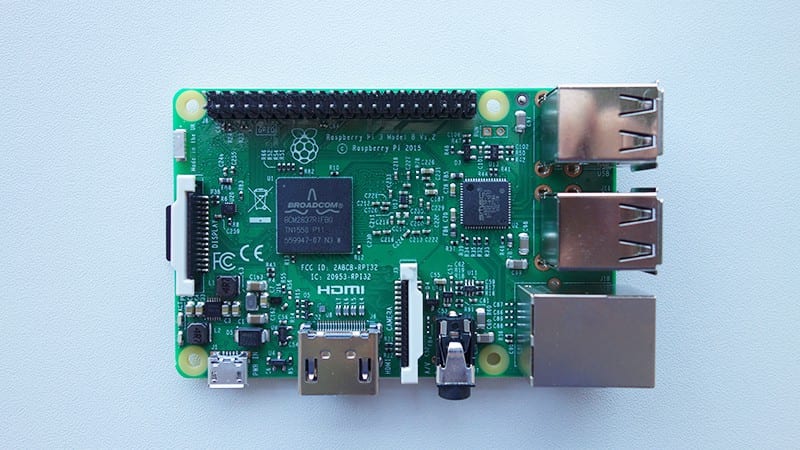
Raspberry Pi
is a credit-card sized computer that plugs into a computer monitor or
TV and uses a standard keyboard and mouse. We all are familiar with Raspberry Pi 1 and Raspberry 2 models. There is no wonder if I say that there are huge fans for Raspberry models. Raspberry satisfied many users with its 1GB Ram, Ethernet port, Micro SD storage, Audio jack 3.5mm port etc.
It gained a huge success in the market as it available at $35 so that
it can be affordable by most of the people. The main aim behind its
launch is to enable people of all ages to explore computing and to learn
how to program in languages. It has been used in a wide array of
digital maker projects, from music machines and parent detectors to
weather stations and tweeting birdhouses with infra-red cameras.
Coming to Raspberry Pi foundation, It is a registered educational
charity based in the UK. Foundation’s goal is to advance the education
of adults and children, particularly in the field of computers, computer
science, and related subjects. This company launched a new model of
Raspberry Pi i.e Third Generation Raspberry Pi, also known as Raspberry
Pi 3.
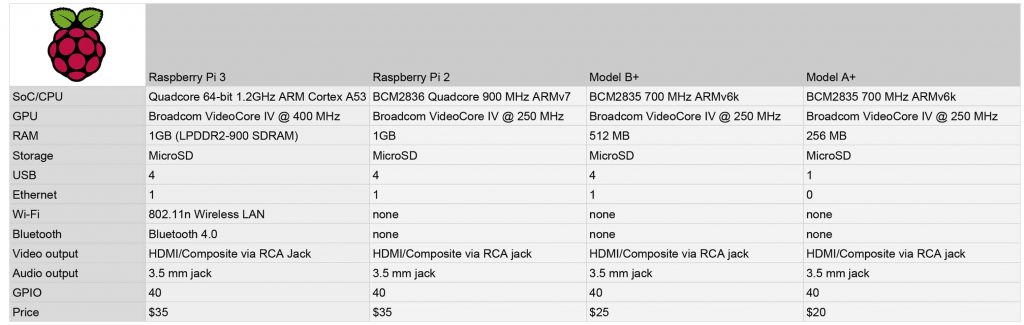
The main drawback of Raspberry Pi 2 is that it lacks WiFi and Bluetooth.Raspberry Pi 3 comes with the additional features like WiFi and
Bluetooth. It also has a fast processor compared to the previous
model. Previously, you needed to shell out around $10 for a USB Wi-Fi
adapter. And also you need to waste a lot of USB storage place for
Bluetooth dongles. And also speed has enhanced by upgrading 900MHz Quad-core CPU
with 1.2GHz 64-bit Quad-core. In this view, it is sure that Raspberry
Pi3 not only comes with additional features but also at a lower cost i.e
$35. Comparison between the 3 models is shown in the below figure.
During the launch of this model, the company says, “We
recommend the Raspberry Pi 3 Model B for use in schools, or for any
general use. Those wishing to embed their Pi in a project may prefer the
Pi Zero or Model A+, which are more useful for embedded projects, and projects which require very low power.”
The following are the features of Raspberry Pi-3:
A 1.2GHz 64-bit quad-core ARMv8 CPU
802.11n Wireless LAN
Bluetooth 4.1
Bluetooth Low Energy (BLE1GB RAM)
1GB RAM
4 USB ports
40 GPIO pins
Full HDMI port
Ethernet port
Combined 3.5mm audio jack and composite video
Camera interface (CSI)
Display interface (DSI)
Micro SD card slot (now push-pull rather than push-push)
VideoCore IV 3D graphics core
Though the new model should be improved in terms of compatibility,
it’s Wi-Fi and Bluetooth work pretty much out of the box and if you’re
booting into the Raspbian graphic interface, setting up both work just
like they would on any modern operating system. Right-click the Wi-Fi
Network icon in the top right corner of Raspbian, then enter your
network information.You can quickly update to Raspberry Pi 3 by simply
swapping your micro SD card from the previous model to the latest
model. The Raspberry Pi 3 is available from the usual list of distributors at launch.
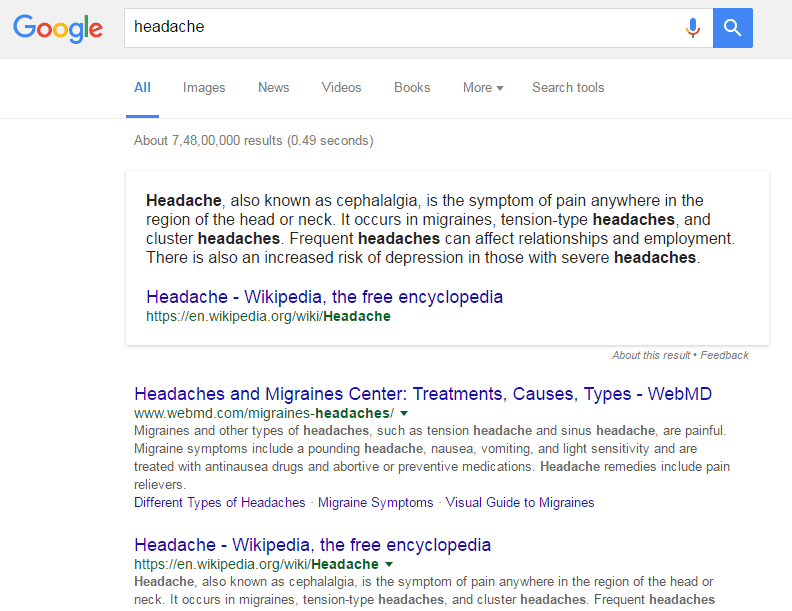
Imagine a situation that you are suffering from the headache.
At that time, you may be in a confusion whether to worry about it or
not. Most of the times you may think it as a normal headache. But
sometimes you may get a doubt that it is not a normal headache and it
belongs to migraine category. As the problem got complicated, immediately to obtain a better solution you will open Google and search
for your disease. The answers given by the Google are very difficult to
understand. This makes the problem more complicated. You are not the
only person who search for medical symptoms. There are millions of
people who search for medical symptoms. But coming to the fact, health
content on the web is difficult to navigate. This tends to lead people
from mild symptoms to scary and unlikely conditions, which can cause
unnecessary anxiety and stress.
So for a better solution, Google came with a new update. It is mentioned in a Google official blog.
The main aim of Google is to help a user to navigate and explore health
conditions related to his symptoms and quickly get to the point where
one can do more in-depth research on the web or talk to a health
professional.
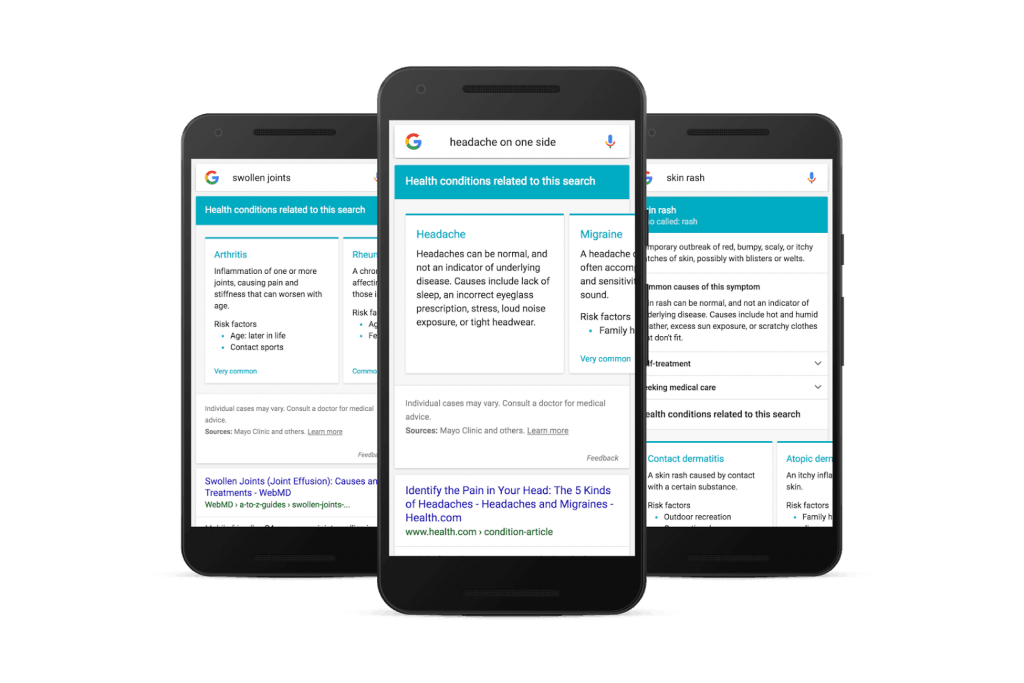
Google says, “when you ask Google about symptoms like “headache on one side,”
we’ll show you a list of related conditions (headache, migraine,
tension headache, cluster headache, sinusitis, and common cold). For
individual symptoms like “headache,”
we’ll also give you an overview description along with information on
self-treatment options and what might warrant a doctor’s visit.”
“We create the list of symptoms by looking for health
conditions mentioned in web results, and then checking them against
high-quality medical information we’ve collected from doctors for our Knowledge Graph.
We worked with a team of medical doctors to carefully review the
individual symptom information, and experts at Harvard Medical School
and Mayo Clinic evaluated related conditions for a representative sample
of searches to help improve the lists we show.”, google added.
Google also says,” Symptom search (like all medical
information on Google) is intended for informational purposes only, and
you should always consult a doctor for medical advice. We rely on search
results, and we reflect what’s on the web. Because of this, your
feedback is especially important to us; we’ll use it to keep improving
the results we show. You’ll notice in the weeks following launch that
when we show symptom search we’ll automatically ask you if the results
are helpful.”
Google confirmed that this update will be available in next few days for mobile users. Google also wants to extend this to other languages and internationally. So the next time you’re worried about your “child with knee pain”
(even though it’s probably just growing pains), or have some symptoms
you’re too embarrassed to run by your roommate, a Google app will be a
helpful place to start.
Do you know who invented E-Mail? Electronic mail was actually invented by then 14-year-old boy named VA Shiva Ayyadurai
– an Indian, who allowed us to communicate with one another within
seconds. He was born to a Tamil Family in Bombay. At the age of 7, he
left with his family to live in the US. In 1978, when he was aged 14, he
developed a full-scale emulation of the interoffice mail system which
he named “E-mail”. It replicated all the functions of the interoffice
mail system: Inbox, Folders, Outbox, Attachments, Memo, Address Book,
etc. These features are now familiar parts of every email system.
Livingston Student Designs Electronic Mail System:
Ayyadurai started his work on the email system for the University of
Medicine and Dentistry of New Jersey when he was studying at Livingston
High School in New Jersey. He closely observed that the desktop of each
secretary, in addition to the typewriter, had an Inbox, Folders, Outbox,
Carbon Copy Paper, Drafts, Address Book, Paper Clips (for attachments),
etc, which they used every day to create and process incoming and
outgoing mail.
US Govt officially recognizedAyyadurai as the inventor of E-mail:
Then he invented an electronic version of this system. He created a
computer programme of over 50,000 lines of code, which electronically
replicated all the features of the interoffice mail system. In 1982, on
August 30, the US government officially recognized VA ShivaAyyadurai as the inventor of E-mail by awarding him the first US Copyright for Email for his 1978 invention.
In spite of this discovery, his name is nowhere in modern history of
computer science. Lost in the pages of history, he is a name not many of
us know. Whoever claims the invention, Ayyadurai will remain the father
of E-mail and honor him for giving us an outstanding invention that
changed the way we communicate. Hope he gets the name in history he
deserves.
Mark Zuckerberg, shared a photo to his Facebook
account, celebrating the growing user base of Instagram, which is owned
by Facebook. Instagram – A Photo sharing social networking site, is also
owned by Zuckerberg, who bought it with a whopping $1 Billion.
More than 500 million people now use Instagram
every month — and 300 million every day. The Instagram community has
more than doubled over the past two years. This is a tribute to Kevin Systrom and Mike Krieger‘s
vision, and to people everywhere who have opened a window into their
world — from big events to everyday moments. Thanks for making Instagram
such a beautiful place.
So, what’s more interesting about this photo?
An eagle-eyed Twitter user named Chris Olson noticed that in the image’s background, his laptop camera and microphone jack appeared to be covered with tape. 3 things about this photo of Zuck:
Reasons behind Taping Camera, Closing USB and Mic Jack ports:
The taped-over camera and microphone jack are
usually a signal that someone is concerned, perhaps only vaguely, about
hackers’ gaining access to his or her devices by using remote-access trojans — a process called “ratting.” (Remote access is not limited to ratters).
What is RATTLING?
A remote access Trojan (RAT) is a malware program that includes a back door
for administrative control over the target computer. RATs are usually
downloaded invisibly with a user-requested program — such as a game — or
sent as an email attachment. Once the host system is compromised, the
intruder may use it to distribute RATs to other vulnerable computers and
establish a botnet.
Google, Facebook, NSA are listening to your conversation secretly says, Edward Snowden;
According to Source, the NSA uses a plug-in called GUMFISH to take over cameras on infected machines and snap photos.
Another NSA plug-in called CAPTIVATEDAUDIENCE hijacks the microphone on targeted computers to record conversations.
Additionally, there is also a news suspecting that Facebook listens to us through our Microphone and Speakers even when they are not in use by the account holder.
So, if Facebook is doing that, there might be
chances of other Social Networking sites doing the same without our
permission. Just, as a extra security measure mark has taped the Mic
port as well.
Should you also consider this?
We all know that Mark is high value target. A recent hacking of his Twitter and LinkedIn
accounts shows that he most likely committed two basic privacy faux
pas: He may have used the same password across several websites and did
not use two-factor authentication.
What you must do now?
It’s advised to Tape the WebCam when not in use. You can do that with any normal Tape.
Block your USB Ports and Mic Jack. If not
blocking, do not insert some random Pendrives or Storage Devices which
are borrowed from your Friends.
Last, but very important, make sure your system software programs and applications are up to date.
Facebook is one of the most popular social networking platforms where
you can share your photos,videos,views and opinions by posting on your
timeline. You can even like, comment, save links or posts whenever you
come across an interesting title or your friend’s latest uploaded photo,
etc., you can simply hit a like or comment it. Facebook is seeking the
attention of billions of people across the world. As it offers an easy
user access, people are getting addicting to this social media platform.
Now, Facebook allows you to upload a 360-degree photo. All you need is the smartphone and a right app. Facebook’s 360
photos work similar to that of a street view in which you’re inside a
moving sphere. For better understanding, check out some of the 360-degree photos
on Facebook before you go for shooting. You can check them simply by
typing "360 photos" into the Facebook search box. As
the feature is new, to view the 360degree photo just click and drag your
mouse or simply tap the photo and move your mobile around if you are a
smart phone user. Street view in which you are inside a moving sphere
Facebook can understand only a specific format of the 360degree
photo. So, the most convenient option to use is Google’s official
Street View camera app (available for android and ios users at free of
cost).
After the successful installation of the “Street view camera”
app, tap the “+” icon and choose the camera. Now, the app will guide
you through the process of capturing all the images that you need. But
you need to ensure that you’re staying as still as possible while you
move your phone around.
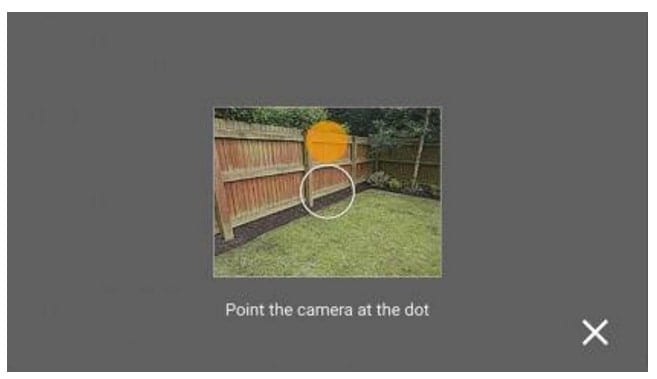
Move the phone around to find the orange dots that appear on
the screen. Each photo is taken automatically once the dot is found.
The circular tick icon at the bottom will gradually get a circular
border as you take all the necessary images. It turns to green when the
capturing of images finished.
You can also use undo option to remove the recent photo.
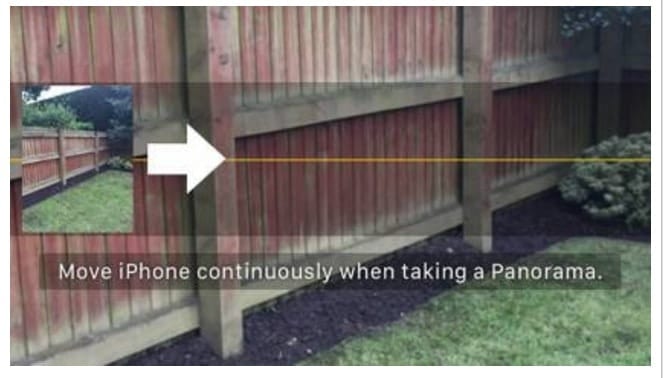
If you are a user of iPhone or the Photosphere, then you don’t have to use the Street View app. You can simply go to panorama mode. Facebook tries to patch the gaps as best when some of the data is missing.
You can make use of the Surround Shot mode (or equivalent option) that comes with the camera if you are a user of Samsung device. You can also use the VR-ready Cardboard Camera available in google for the android. Photosphere
is similar to that of street view camera app whereas VR-cardboard
camera differs by capturing a full circle of images by asking you to
slowly rotate your phone to the right in one smooth motion. You can also
add an audio to it.
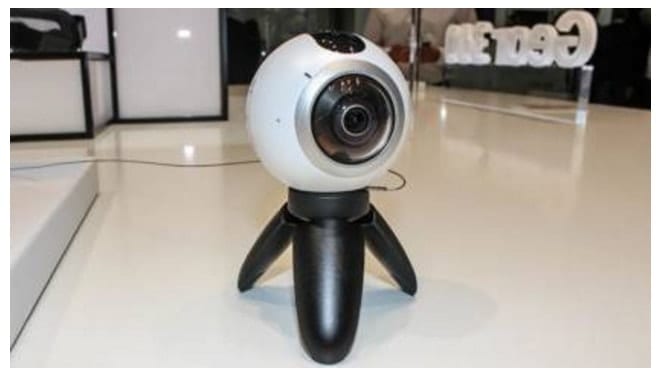
You can get a better result when you use a dedicated 360 camera. Samsung Gear 360, Ricoh Theta S, LG 360 Cam are some of the cameras under this category.
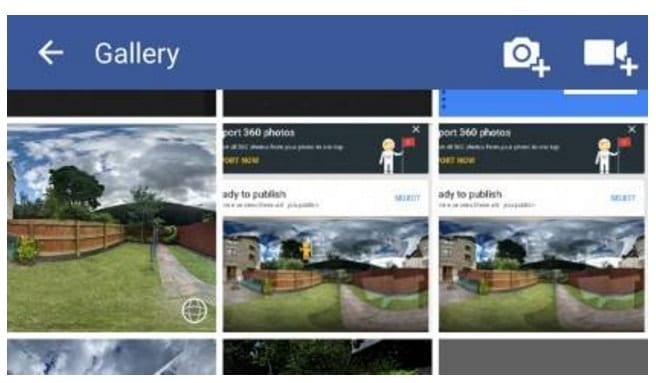
After taking the 360degree photo, you need to upload it on Facebook.
It is similar to that of uploading a normal photo i.e by tapping on the
photo in the status update box. But you can’t yet create a 360 photo
directly by using Facebook’s own camera app.
But Facebook is developing the app to add this feature as soon as
possible. You can have the control over the uploaded photo i.e privacy
settings, visibility similar to that of other posts on the facebook.
You can also add the location, details, and comments to the
photo. You can preview your photo by clicking and dragging the mouse
(in a web browser) or just moving the phone around (on a smartphone). On
every 360-degree photo, there is a small icon that looks like a radar
in the lower right corner. This icon shows you where the perspective is
pointing at any given moment.
So, start taking 360-degree photos and share them with your friends by uploading on Facebook.
In March 2016, Google has made an official statement
that https, is not a part of their ranking factor. Since, then a lot of
people have been moving their blogs/websites to https to get an edge in
Search results. Looks like this move has favoured a lot of them.
Currently, about 34% of the Search Results are only HTTPS. Or 1/3rd of the results on Google Search are HTTPS.
Advantages of HTTPS over HTTP:
SEO: As stated above, we already have that SEO benefit of ranking well. 3 out of 10 results comprises of HTTPS. That means the chances of your blog showing up in search results is high if you have moved to https.
Secured Browsing and Credibility : Most of the
people trust blogs that runs on https. It gives a feeling of branded
content. Additionally, users feel their browsing is very secure and tend
to browse or enter any information on the site without any hick-up.
High CTR: That means, you get high Click through
rate when compared to the blogs that do not run on SSL. And Click
Through Rate plays a huge role in ranking boost.
Of course, Google is a bit inclined towards HTTPS blogs for a good
reason. They also, made it clear that to build progressive web apps,
your domain must run on https. Looks like, Google is looking forward to
launch many products in future that runs only on https. With regards to
increased security threats with the growing technology, this is indeed a
great initiative by Google, encouraging more Bloggers and Web Masters
to move to https.
Do you know how much Google knows about you?
A lot. It tracks almost everything you do on the Internet and collects
the data from all your different devices in order to target relevant ads
to its users and better improve its service. Since the information that
Google gathers is pulled from Android, Chrome, and all of Google’s web
services (Google, Gmail, YouTube, Maps, Play Music, etc), the information that is collected is staggering.
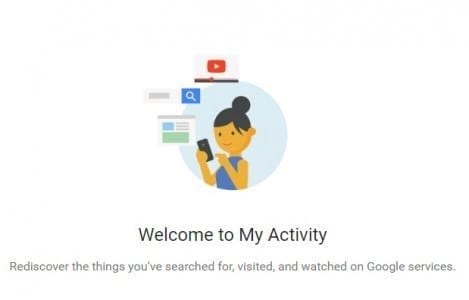
Now, Google has launched a new dashboard called ‘My Activity‘
to make it easier to control all the data by consolidating the
information that it collected about you. It shows all of your online
activities such as search history, music you listen to, video searches
and even places you have visited. It is very similar to Facebook’s
Activity Log, where you can see all of your activities on the social
networking platform.
The new dashboard improves upon Google’s previous ‘My Account’ dashboard, which allows you to manage which content Google collects and associates with your Google account.
The tech giant, Google claims that it is
collecting all the information to create a full profile for you so that
it can improve its services that it offers. “My Activity is a central
place to view and manage activity like searches you’ve done, websites
you’ve visited, and videos you’ve watched,” Google says, adding, “Your
activity is listed as individual items, starting with the most recent.
These items might be part of bundles, which group similar activity
together.”
Google’s ‘My Activity’ Dashboard:
Google has been notifying its users via
Chrome (if synced with your Google account) and Gmail about the new
tool. You can also access it by going to the ‘My Account’ app on your
Gmail, where you would notice the ‘My Activity‘ app added at the end. This ‘My Activity’ dashboard works on both desktop and mobile.
The new dashboard not only gives you a
way to track your online behaviour, it also allows you to choose to
delete or edit any content if you want to. Also, note that the app will
show your search activity only in case you use Google as your primary
search engine and own a Google account. Otherwise, of course, Google
would have no access to your online activity.
Meanwhile, Google has also introduced a
new feature that lets you personalise the ads that you see. These ads
are generally based on the content you search, the websites that you
visit and the videos you watch. A new opt-in option will ask if you want
to personalise ads based on your age, gender, and search history to
display on third-party sites, reports Wired.
Therefore, my making changes to your
activity track, you can also customise the kind of ads that Google pops
up on your screen. The feature is beneficial for those who want control
over how ads work across all their devices linked with Google account
and also gives them the ability to block some ads they don’t want to
see.